
Wake Claude Before You Do
It’s 11:00. You’re in the middle of a task, and Claude Code stops: usage limit reached, resets at 14:00.
Three hours of waiting. Not because you worked too much. Because you started at 9:00.
The clock starts when you do. So start it earlier.
Claude counts usage in 5-hour blocks #
On the Pro and Max plans, Claude gives you usage in 5-hour blocks. The block doesn’t start at a fixed hour. It starts with your first message.
Send your first prompt at 9:00 and your block runs until 14:00. Use it all by 11:00 and you wait.
The fix isn’t a bigger plan. It’s moving that first message. That’s what a ping does: a tiny message, sent on a schedule, that only says “ping”.
A ping at 7:00 gives you a third block #
Say you work from 9:00 to 18:00.
- No ping. Blocks run 9:00 to 14:00 and 14:00 to 19:00. That’s two blocks in your day. Run out at 11:00 and you wait until 14:00.
- Ping at 7:00. Blocks run 7:00 to 12:00, 12:00 to 17:00, and 17:00 to 22:00. You use all three. Run out at 11:00 and you wait until 12:00.
The first block is half spent before you sit down. That’s fine. Nobody was using it anyway.
Same plan. Same work. Three blocks instead of two.
A ping during a running block does nothing. The next block starts with the first message after the old one ends. So ping once per block, at 7:01, 12:01 and 17:01. The extra minute makes sure the old block is over.
Set it up with a routine #
Claude Code on the web can send the ping for you at set times. It calls this a routine. Your computer can stay off, and the routine uses your plan, so it starts your block.
Two choices keep it cheap: Haiku 5.5, Claude’s smallest model, and a machine that can’t reach anything. A ping needs no internet, no code, and no connected apps.
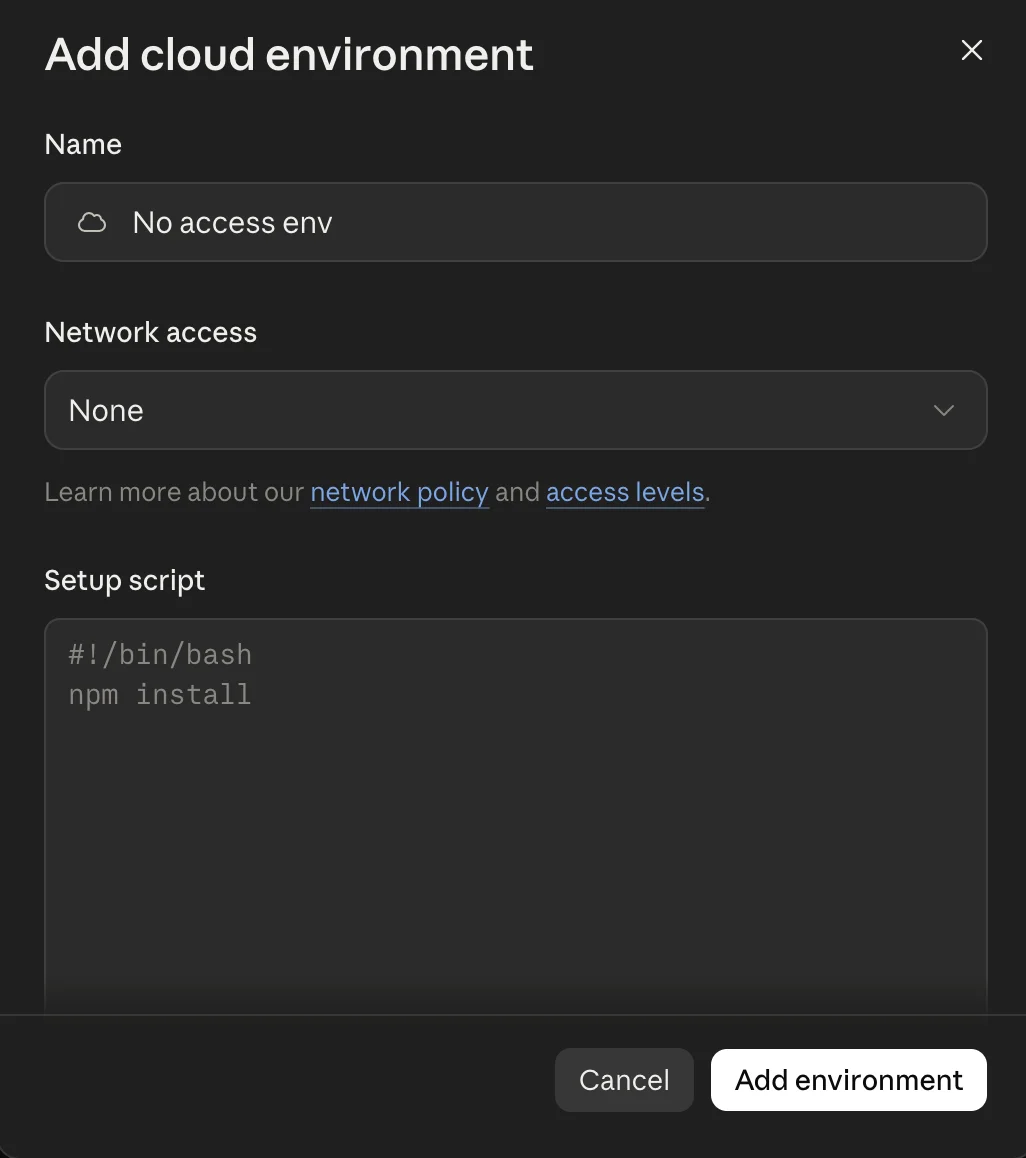
1. Make an empty machine. In Claude Code on the web, click “Add cloud environment”. Call it “No access env”, set “Network access” to None, and leave the script box empty.
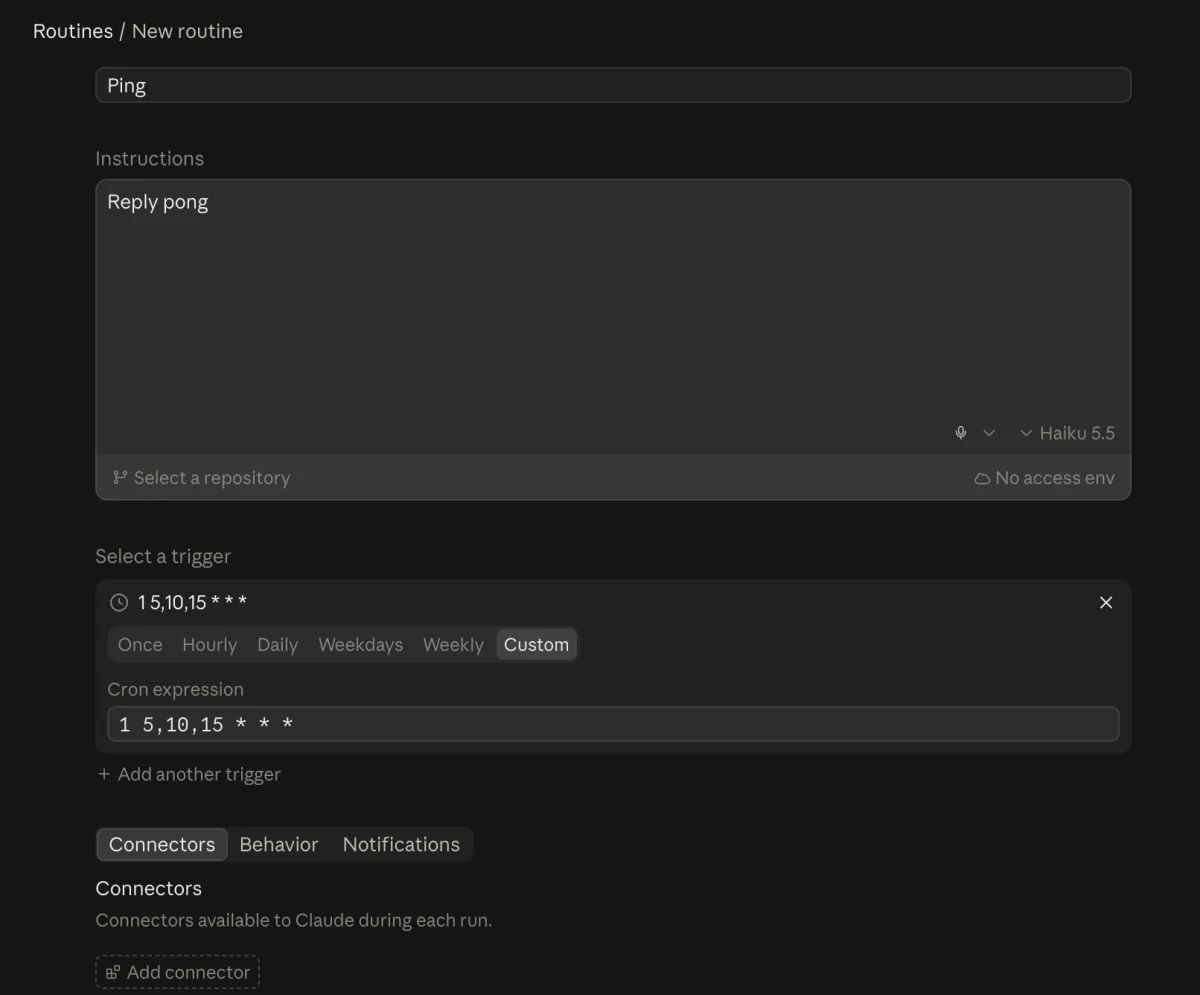
2. Create the routine. Open Routines and add a new one. Name it “Ping”, write “Reply pong” as the instructions, and pick Haiku 5.5 and “No access env”. Skip “Select a repository” and “Add connector”. Under “Select a trigger”, pick Custom and type this schedule:
1 5,10,15 * * *It reads as “minute 1 of hours 5, 10 and 15, every day”. The times are in UTC, which is London time in winter. So this means 7:01, 12:01 and 17:01 in Spain in summer. Shift the hours to match where you live, and again when the clocks change.
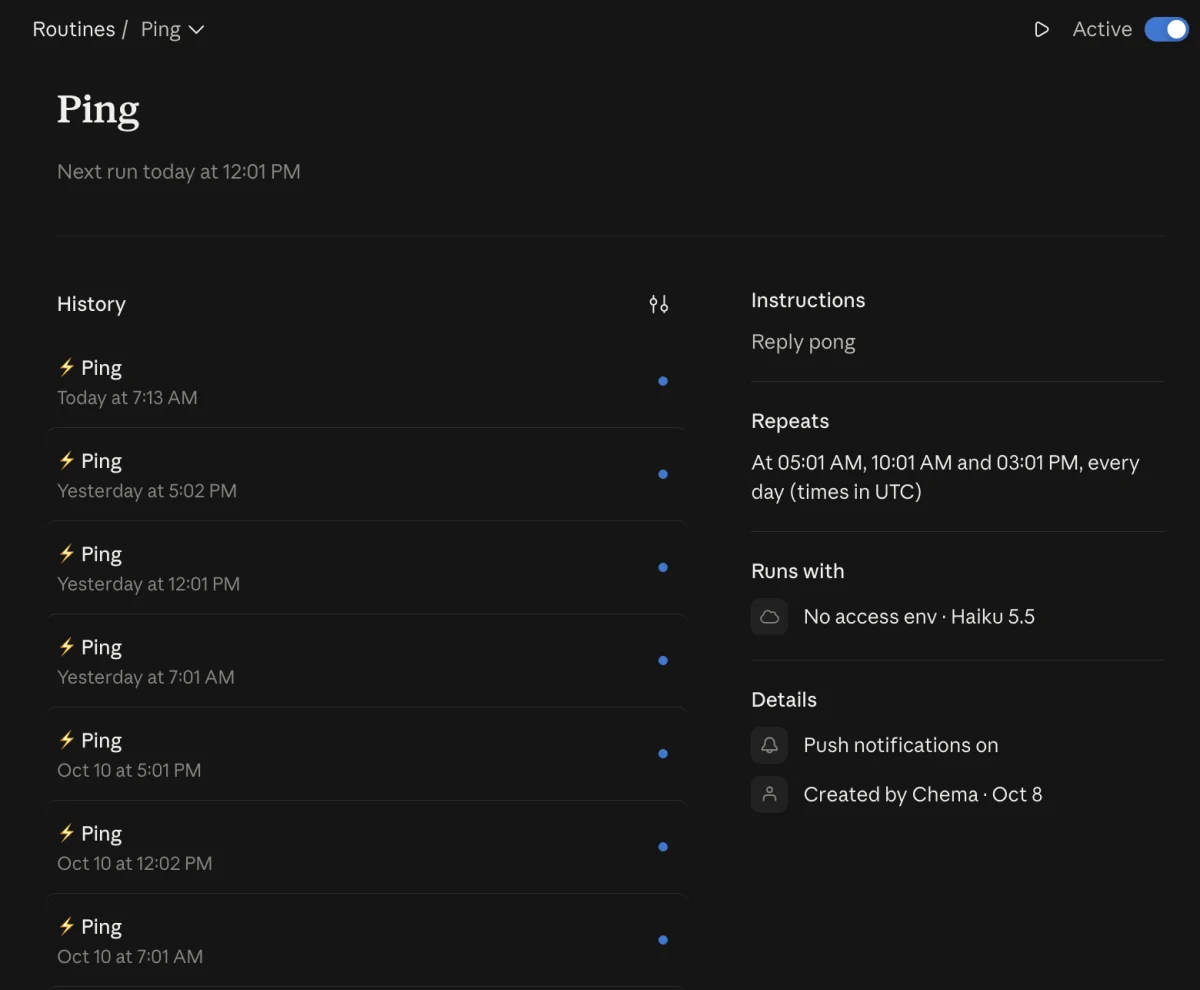
3. Check the runs. The routine page lists every run. Runs can start a few minutes late: this morning’s ran at 7:13, not 7:01.
4. Check your usage. At 9:07 my usage page said 0% used, resets in 3 hours. The block started with the ping, before I sat down.
The same ping works from your own computer with cron, the scheduler built into your Mac. It takes four pieces: a token, a small script, a schedule, and a wake time. 1. Get a token. cron runs outside your login, so it can’t read the Claude login your Mac keeps in its password store. Without a token, the log says 2. Write the script. Save this as A plain Don’t use Run 3. Schedule it. Run 4. Wake the Mac at 6:58. A sleeping Mac skips the 7:01 ping. Undo it later with A locked screen is fine. A closed lid is the weak spot: a MacBook shut with no external screen can wake for a moment and fall back asleep before 7:01. The next morning, open Rather let an agent do steps 2 to 4? Save the token yourself, then paste this into Claude Code, Codex, or any agent that can run commands: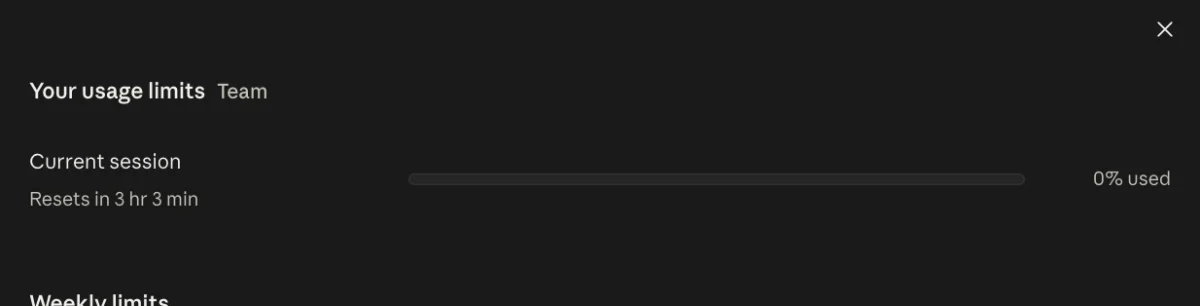
Deep Dive: No routines? Run it from your Mac
Not logged in · Please run /login. claude setup-token opens your browser and prints a token that lasts a year and belongs to your plan. Save it in a file only you can read:claude setup-token
mkdir -p ~/.config/claude-ping
pbpaste > ~/.config/claude-ping/token
chmod 600 ~/.config/claude-ping/token~/.local/bin/claude-ping:#!/bin/sh
export PATH="$HOME/.local/bin:/opt/homebrew/bin:/usr/local/bin:$PATH"
export CLAUDE_CODE_OAUTH_TOKEN="$(cat "$HOME/.config/claude-ping/token")"
cd /tmp || exit 1
date "+%F %R"
claude -p "ping" --model haiku \
--setting-sources "" --strict-mcp-config --tools "" \
--disable-slash-commands --system-prompt "Reply pong." \
--no-session-persistenceclaude -p "ping" sends your whole setup with it: long instructions, tool list, plugins, connected apps, CLAUDE.md files. On my machine that was about 30,800 tokens to say “ping”. These flags turn all of that off. With Haiku, the same ping is 482 tokens.--bare. It looks perfect, but it skips your Claude login and needs an API key. Then you pay per message, and your plan’s clock never starts.chmod +x ~/.local/bin/claude-ping, then ~/.local/bin/claude-ping. You want pong.crontab -e and add one line. Here the times are your Mac’s local time:1 7,12,17 * * * $HOME/.local/bin/claude-ping >> $HOME/.claude-ping.log 2>&1sudo pmset repeat cancel.sudo pmset repeat wake MTWRFSU 06:58:00~/.claude-ping.log. You want a date and pong for each run.Set up "claude-ping" on this Mac so my Claude usage block starts at 7:01, 12:01, and 17:01 every day.
1. Check that ~/.config/claude-ping/token exists. Never read or print it. If it is missing, stop and tell me.
2. Create ~/.local/bin/claude-ping with this content and make it executable:
#!/bin/sh
export PATH="$HOME/.local/bin:/opt/homebrew/bin:/usr/local/bin:$PATH"
export CLAUDE_CODE_OAUTH_TOKEN="$(cat "$HOME/.config/claude-ping/token")"
cd /tmp || exit 1
date "+%F %R"
claude -p "ping" --model haiku --setting-sources "" --strict-mcp-config --tools "" --disable-slash-commands --system-prompt "Reply pong." --no-session-persistence
3. Add this line to my crontab. Keep any lines already there:
1 7,12,17 * * * $HOME/.local/bin/claude-ping >> $HOME/.claude-ping.log 2>&1
4. Run ~/.local/bin/claude-ping. It should print the date and pong.
5. Do not use --bare. Do not run sudo. Tell me the pmset command to wake the Mac at 06:58 so I can run it myself.
6. Tell me what you changed and the test result.
Your first message still wins #
The ping is a default, not a lock. If you send a real prompt at 6:30, your prompt starts the block, and the schedule shifts with it. Each ping also counts toward your weekly limit. A “pong” from Haiku three times a day, you won’t notice.
This works with the 5-hour blocks as Anthropic runs them in October 2026. If the rules change, change the times.
It pairs well with cutting the token bill on both ends. That post makes each block last longer. This one gives you more blocks.
Switch tools, keep your setup #
Sometimes you still hit the limit. Three blocks, all spent, and the work isn’t done.
That’s when a second tool pays off. Codex, Cursor, Gemini CLI, or whatever else you pay for. The catch: each tool reads its instructions from different files. Your rules, skills, and agents live in .claude/, and the other tool can’t see them. So you switch, and you start from zero.
That’s why I built agnostic-ai. You write your rules, skills, and agents once. agnostic-ai sync turns them into the files each tool reads. When Claude runs out, open the next tool. Same rules, same skills, same project context.
Don’t wait for the clock. Set it. And when it runs out anyway, switch tools, not setups.